To control transfers between warehouses, make every transfer a single documented movement with a different sender and receiver, a clear "in transit" status, and proof of receipt that records what arrived unit by unit. Stock rarely disappears inside a warehouse. It disappears between two of them: in the hours or days after it has left the sender's books and before it has entered the receiver's. This article shows how to close that gap step by step, from the request and picking, to handing over to the carrier, to receiving and inspecting, to chasing late shipments before they turn into a shortage at the next count.
Key takeaways
- Stock in transit is not "out of stock". It sits in a third location with an owner and an expected duration, and it must show in your reports.
- Whoever created a transfer should not confirm its receipt. Separating sender and receiver is the simplest control against errors and manipulation.
- Record receipt per unit (received, damaged or missing), not as a total count and a signature.
- Review the age of shipments in transit daily or weekly, and escalate any shipment that has exceeded the usual time for its route.
Why does stock go missing between two warehouses?
In most companies with more than one warehouse or branch, a transfer starts with a phone call: "send us five units of this item". The storekeeper picks the units, hands them to a driver, and writes a slip or posts a photo in a WhatsApp group. At the other end someone signs the slip without counting, or counts later when there is time. Three problems follow again and again:
- Nobody owns the shipment on the road. The sender considers their job done at handover; the receiver considers theirs not yet started.
- The balance changes in one place only. Stock is deducted at the source and added at the destination late, or twice, so the warehouses no longer add up to reality.
- The gap shows up late. A missing or damaged unit is found weeks later at the count, not at receipt, and by then nobody can tell whether it was lost in the first warehouse, on the road or in the second.
This gap is one of the recurring reasons physical stock does not match the books; we cover it alongside the other causes in why physical inventory doesn't match your records.
Who is responsible for stock in transit?
The simplest working rule: units stay recorded against the sending warehouse until the receiving warehouse confirms they arrived, with a dedicated "in transit" status. Under this rule, stock does not vanish from the books the moment it leaves, and it does not appear at the destination before anyone there has seen it. "Where is this unit now?" always has one answer: in a warehouse, or on the road with a named carrier since a known date.
The logic is not new in supply chains. In the data-exchange standards published by GS1 for delivery management, the shipper sends a Despatch Advice describing the contents of a shipment before it arrives, and the receiver replies with a Receiving Advice that reports what actually arrived compared with what was advised as sent. Inside one company you do not need EDI messages, but you need the same idea: an announcement of what left, a confirmation of what arrived, and a comparison of the two.
A controlled transfer in five steps
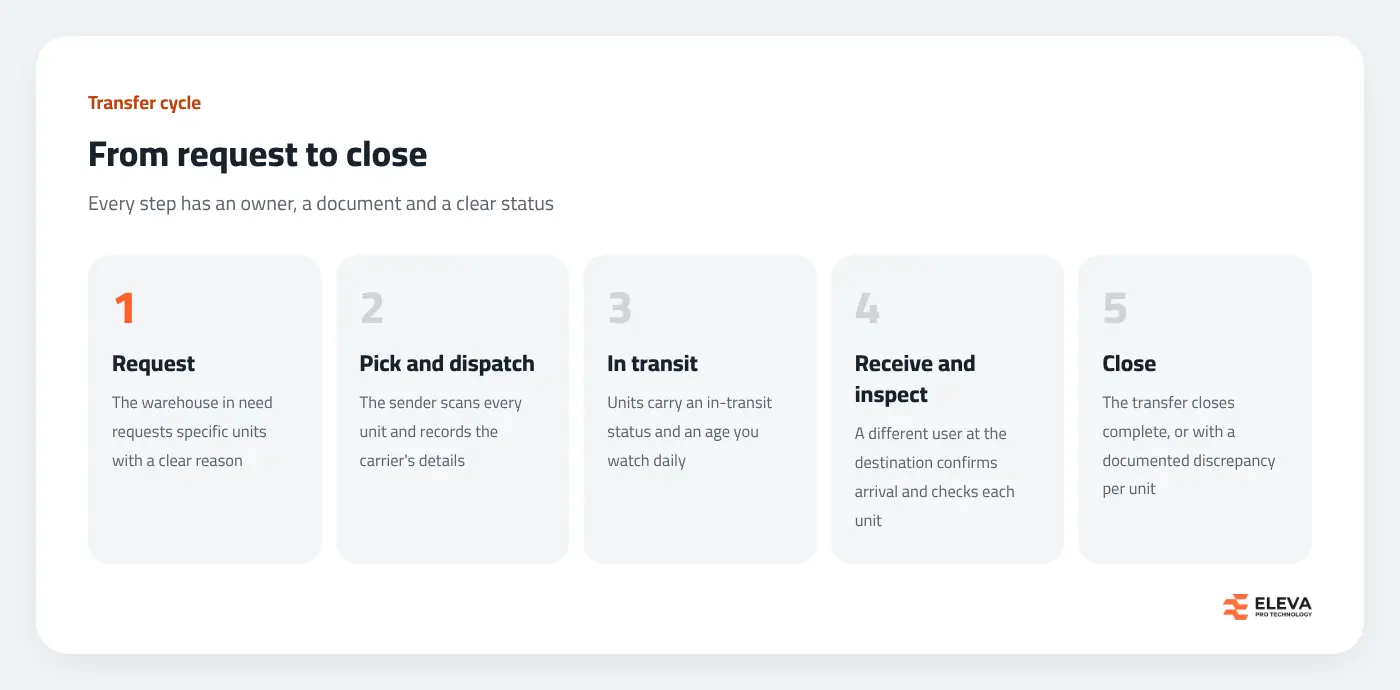
- Request: the warehouse in need asks for specific units with a clear reason (rebalancing stock, supplying a project site, stocking a new branch). If the requester cannot operate the sending warehouse, the request waits until one of that warehouse's operators dispatches it, and the units are reserved so they cannot join another movement.
- Pick and dispatch: the sender scans every unit's label instead of typing codes, and records the carrier's name, phone number, ID number where available and the waybill number. The status now becomes "in transit".
- In transit: the shipment has an age that starts at handover to the carrier. That age, not just the shipment's existence, is what management follows.
- Receive and inspect: a user at the destination, other than the one who created the transfer, checks the carrier's identity, inspects each unit and records its condition.
- Close: the transfer closes as "completed" if everything arrived intact, or "completed with discrepancy" if units were damaged or missing, with notes that describe the problem.
The same steps work whether the two warehouses are in the same city or one is in Cairo and the other in Riyadh. What changes is the expected time on the road and the level of approval required.
What should a transfer document contain?
The transfer document is the only reference in any dispute, so it should answer every question that might be asked later:
| Field | Why it matters |
|---|---|
| A sequential transfer number | Links the paper document to the movement in the system and prevents duplicates. |
| Source and destination warehouse | Defines the route and who is responsible at each end. |
| Each unit's code and serial number | Receipt is checked unit by unit, not by count alone. |
| Carrier details and waybill number | You know whom to call if the shipment is late, and can verify their identity on arrival. |
| Who created, dispatched and received it, with dates | Builds a reviewable record and proves the receiver was not the sender. |
| Each unit's condition on receipt and discrepancy notes | Turns "the shipment was short" into specific facts: which unit, and what was wrong. |
| The signed delivery note (attached) | Extra evidence in a dispute with the carrier or between branches. |
Proof of receipt: a signature is not enough
A signature on paper proves that someone received something. It does not prove that every unit arrived, that the carrier is the person recorded at dispatch, or that the signer was authorised to receive. The strongest practical proof combines three things: a secret only the right carrier knows, an inspection of every unit, and a named user who is not the transfer's creator.
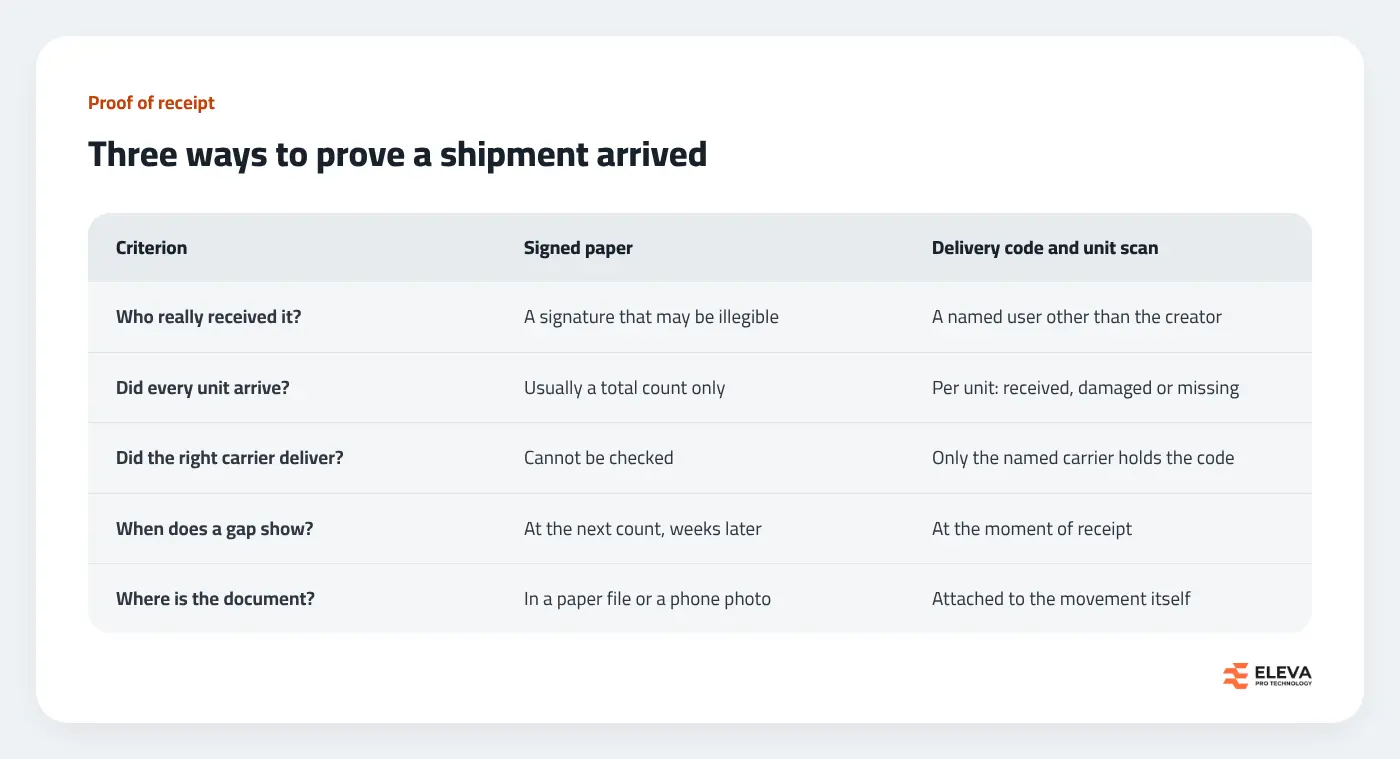
The delivery code idea is simple. At dispatch, a short code is issued and given only to the carrier, and the receiver can confirm receipt only by entering the code the carrier provides. If the code reached the wrong person or has expired, it is cancelled and a new one issued. A transfer can no longer be "closed" from a distant office before the carrier has actually arrived.
How to handle discrepancies on arrival
A discrepancy recorded at receipt is far cheaper than one discovered at a count, because the evidence is still there: the carrier is in front of you, the box is open and the sender remembers what they picked. Set clear rules for each case:
- Damaged unit: received at the destination but placed "under inspection", not "available", until someone decides to repair or write it off. It cannot be issued before then.
- Missing unit: recorded as missing by name and code, not as a gap in a total. If it turns up later, it is marked found from its own record, so both events stay on file.
- Extra unit not on the document: never added silently to the destination's balance. Return it or record it as a separate movement once you know where it came from, because it is usually a shortage somewhere else.
- Written notes: describe the problem (wet carton, broken seal, a unit with a different serial number) and add a photo if possible, attached to the transfer itself.
Each discrepancy then needs an owner who follows it to closure: is the carrier liable, was it a picking error, and what did it cost? How to calculate the true cost of a lost unit, not just its price, is covered in the hidden cost of lost inventory.
Following stock on the road: shipment age
Having shipments in transit is normal. A shipment that has been on the road twice as long as usual without anyone asking about it is not. Track the age of each shipment from handover to the carrier, group shipments into age bands, and set an expected time for each route.
Illustrative example: a company has a main warehouse in Cairo and branches in Alexandria and Assiut. Management sets the usual time for the Alexandria route at one day and for Assiut at two. The rule: once a shipment exceeds twice the usual time (two days for Alexandria, four for Assiut), the sending warehouse's supervisor calls the carrier and the receiving warehouse that same day, and anything older than a week goes to the operations manager. The numbers are for illustration; set yours from your own shipment history.
Make this review part of the manager's weekly report alongside other pending movements; we suggest the full set of reports in our article on the warehouse reports every manager should see weekly.
Who dispatches and who receives: permissions for transfers
A transfer is a clear case of segregation of duties: the person who requests should not be the one who dispatches, and the person who creates the transfer should not be the one who confirms receipt. Each user should also act only on their own warehouse: the Alexandria storekeeper can see Cairo's stock and request from it, but cannot dispatch from it. We explain how to build the full matrix in warehouse roles and permissions.
How Eleva's system handles this
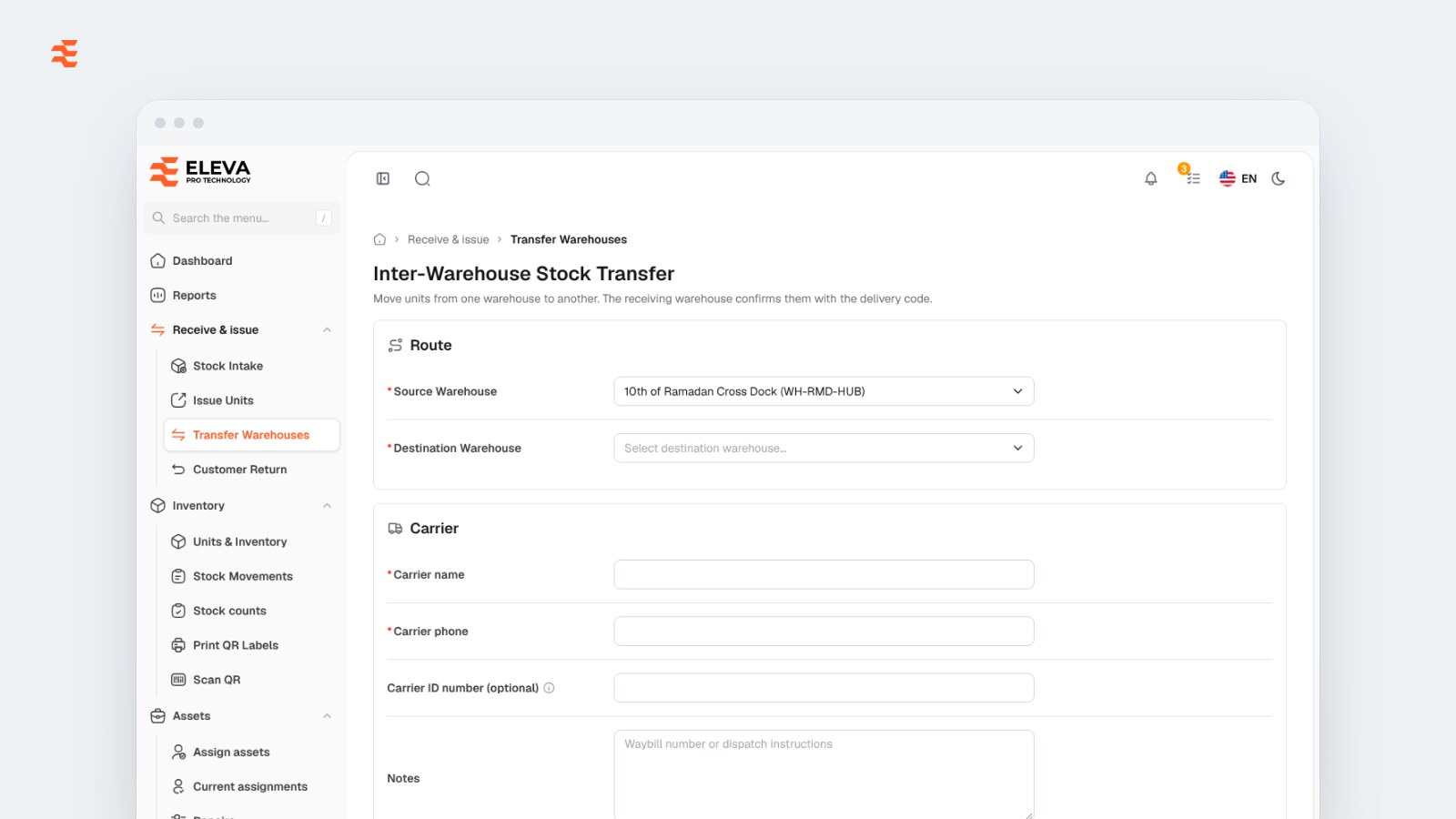
In the Warehouse Tracking & Management System we build at Eleva, a transfer between warehouses is created by choosing the source and destination warehouses and the carrier's details (name and phone are required), then adding units by search or by scanning their QR codes. The units stay recorded in the source warehouse until the destination confirms receipt.
When you dispatch and receive a transfer, a six-digit delivery code is issued for the carrier only. The receiver enters it and marks each unit as received, damaged or missing, and can attach a signed delivery note. Damaged units go under inspection, missing units are marked lost, and the transfer closes as "completed with discrepancy". The code locks after five wrong attempts and expires after a period the administrator sets (72 hours by default), and the user who created the transfer cannot receive it.
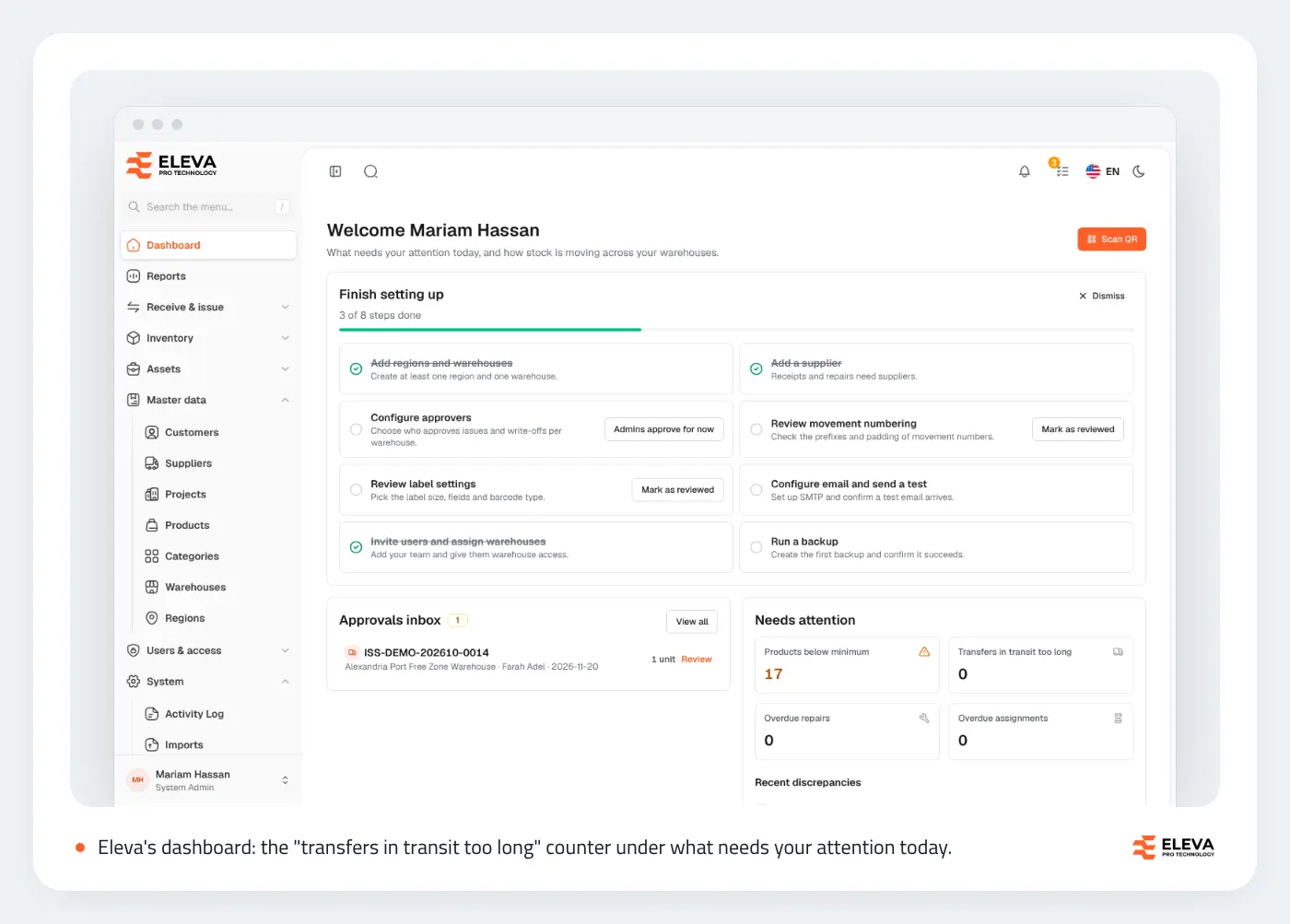
For follow-up, the in-transit aging report lists unreceived transfers in age bands from under one day to over 14 days, with the carrier, value and code expiry, and the dashboard counts transfers that have been in transit too long.
FAQ
What is the difference between a transfer and an issue?
A transfer moves units from one of your warehouses to another, so they stay in your stock. An issue sends units out to a customer, project or recipient outside your warehouses, and usually goes through a different approval cycle.
Should stock be deducted from the sending warehouse the moment it leaves?
Preferably not before receipt is confirmed. It stays on the sending warehouse with an "in transit" status, so it shows in reports and cannot be issued, then moves to the destination at receipt.
What should I do if a shipment arrives short?
Do not reject the whole shipment or accept it as complete. Receive what arrived, record the missing units by code as missing, note what you observed, and start checking with the sender and the carrier the same day.
Conclusion
Transfers between warehouses come under control when you treat "the road" as a location with an owner and an age, separate the sender from the receiver, and record receipt per unit. Start with a complete transfer document and an escalation rule for late shipments, then choose a system that enforces those rules instead of relying on people to remember them; the selection criteria are in our guide to choosing a warehouse management system. If you would like to see the transfer cycle on data close to yours, contact us.
Try the Warehouse Tracking & Management System yourself: the live demo with sample data, and the step-by-step user manual. The system is sold as a one-time licence or a fixed annual fee plus annual maintenance, installed on your company's server with no fee per warehouse or user. Request a demo from the product page.