Assign warehouse permissions so that no single person holds two conflicting duties on the same transaction: whoever requests does not approve, whoever approves does not hand over, whoever dispatches does not confirm receipt, and whoever counts does not approve their own adjustments alone. Then limit each employee to the warehouses they actually work in. This is segregation of duties, and it is not bureaucracy; it is the cheapest way to prevent errors and manipulation before they happen. This article turns the principle into a practical permissions matrix for a real warehouse, and explains what to do when your team is too small for full separation.
Key takeaways
- Separate four functions: authorisation, physical custody of the goods, recording, and reconciliation or counting.
- A role decides what an employee can do; their warehouse assignment decides where. You need both.
- Tier approvals by the movement's value, and never let one person approve two levels of the same movement.
- If your team is too small for full separation, compensate with management review, an activity log and surprise counts.
- Review permissions periodically, and immediately whenever someone joins, moves or leaves.
Why permissions matter in a warehouse
A warehouse is where value turns into things people can carry, which is why most occupational fraud targets assets rather than financial statements. The Association of Certified Fraud Examiners' 2026 study analysed 2,402 occupational fraud cases across 143 countries and territories: asset misappropriation appeared in 90% of them, and the overall median loss was $104,000 per case. The same study notes that more than half of the cases involved a lack of internal controls or an override of existing ones.
These are global figures, not specific to one industry, but the lesson for any warehouse is clear: most losses need no elaborate scheme, just one person with more access than they need and nobody reviewing what they do. Honest mistakes follow the same pattern. An employee who issues, records and counts on their own will not catch their own errors, because nobody else ever looks at the process.
Segregation of duties in warehouse terms
The COSO internal control framework, as summarised by the University of Arizona, expects management to separate incompatible duties and to put alternative controls in place where separation is not practical. The same idea appears for information systems in NIST SP 800-53 control AC-5 (Separation of Duties): identify the duties that must be held by different people, then define system access so it supports that separation, reducing the risk of abuse without collusion.
In a warehouse, this translates into four functions that should not sit in one pair of hands for the same movement:
| Function | Warehouse examples | Usually held by |
|---|---|---|
| Authorisation | Approving an issue, a transfer or a write-off | Warehouse, operations or finance manager, depending on value |
| Custody | Physically receiving, storing and handing over goods | The storekeeper and warehouse operators |
| Recording | Entering movements and editing item data | The storekeeper or a data-entry clerk, with a trail nobody can delete |
| Reconciliation | Counting, comparing physical to book stock, adjusting differences | A count team or internal auditor independent of custody |
The permissions matrix: who does what
Start with a list of the actions that happen in your warehouse, then decide what each role may do. The table below is an example for a mid-sized company with several warehouses; adapt it to your own job titles:
| Action | Storekeeper | Warehouse manager | Approver (operations/finance) | Auditor |
|---|---|---|---|---|
| Receive goods from a supplier | Yes | Yes | No | No |
| Create an issue request | Yes | Yes | No | No |
| Approve an issue | No | Yes, not their own | Yes, higher levels | No |
| Dispatch a transfer | Yes, from their warehouse | Yes | No | No |
| Confirm a transfer's receipt | Yes, at their warehouse, not one they created | Yes | No | No |
| Perform a stock count | Alongside another team | Plans the count | No | Yes |
| Request a write-off or adjustment | Yes | Yes | No | No |
| View reports and the activity log | Own warehouse only | Own warehouses | Yes | Yes, all warehouses |
The conflicts you must prevent
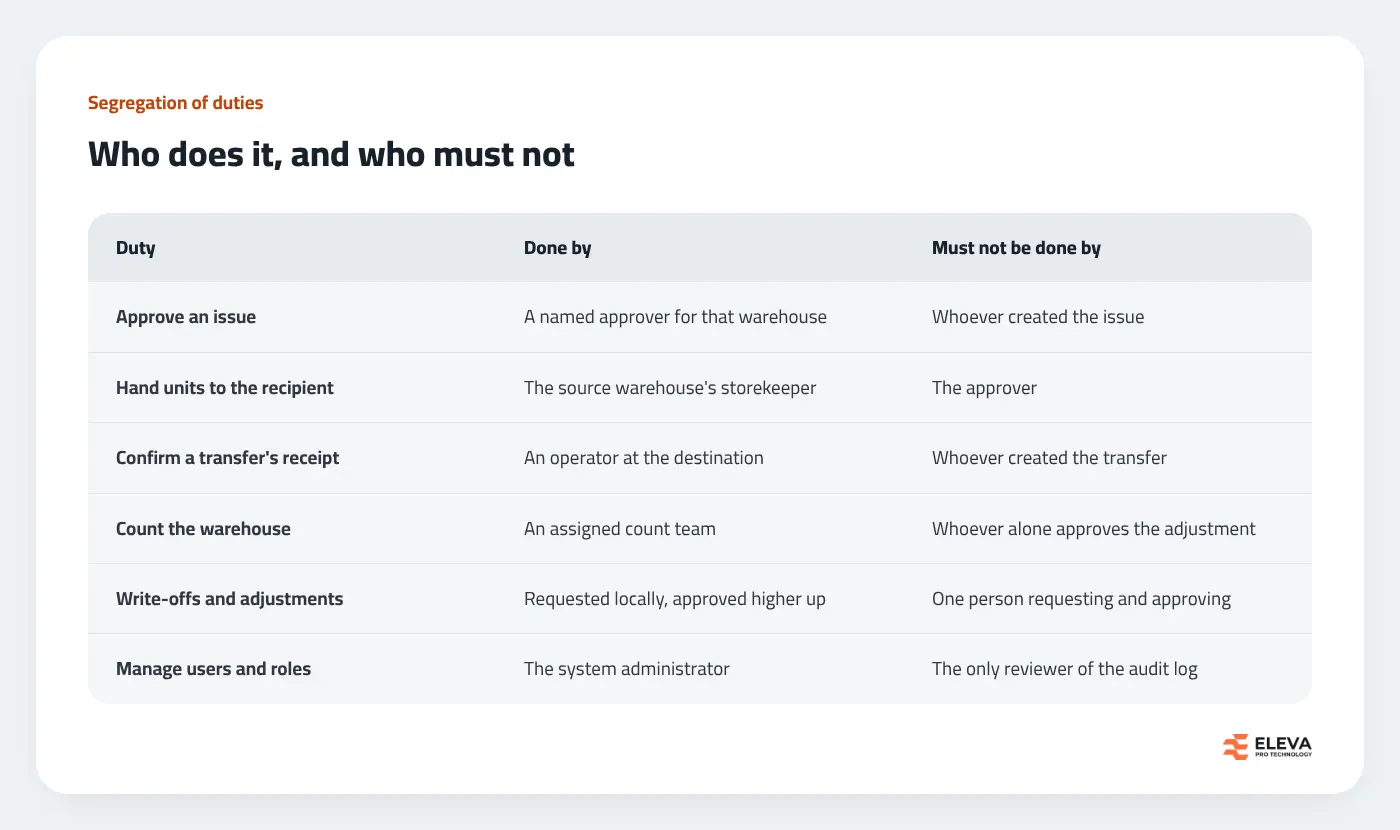
Some conflicts appear in almost every warehouse, so let the system block them instead of relying on people to remember:
- Approving your own request. The simplest and most common conflict. An approval the requester gives themselves is worth nothing.
- Approving two levels of the same movement. If a movement needs two levels, it needs two people.
- Dispatching a transfer and confirming its receipt. Whoever created the transfer must not confirm its arrival, or stock can be "moved" on paper without ever leaving. Receipt is covered in detail in controlling inter-warehouse transfers.
- Counting your own warehouse and settling the differences alone. A count reveals discrepancies and an adjustment erases them from the books; if one person does both, no shortage will ever show.
- Managing users and being the only reviewer of the audit trail. NIST's AC-5 gives a close example: people who administer access control should not also administer audit functions. Give the activity log a reviewer other than the system administrator.
Permissions by warehouse, not just by role
A role on its own is not enough once you run more than one warehouse. The Jeddah storekeeper and the Dammam storekeeper share a role, but neither should issue stock from the other's warehouse. This is least privilege, control AC-6 in NIST SP 800-53: users get only the access they need for their assigned tasks.
In practice, link each user to the warehouses they work in, with an access level for each:
- Operate: the user's full role permissions apply in this warehouse.
- Request: they can see the stock and request a transfer from it to their own warehouse, but cannot issue, receive or adjust.
- View only: they see stock and movements without taking any action, which suits auditors and senior management.
A branch warehouse can then see what the main warehouse holds and request from it, without being able to take anything out of it.
Remember that permissions belong to an account, not a person: if a colleague knows the approver's password, the whole separation collapses. Do not allow shared accounts on warehouse devices, and require two-factor authentication at least for anyone who can approve, write off or manage users.
Tiered approval by value
It makes little sense for a low-value cable to go through the same path as twenty devices. The answer is approval levels triggered by the movement's total value.
Illustrative example: level one applies to every movement and is approved by the warehouse manager. Level two is added once an issue reaches SAR 20,000 and is approved by the operations manager. Level three is added at SAR 100,000 and is approved by the finance director. An issue worth SAR 30,000 therefore needs levels one and two, from two different people, in order. The thresholds are for illustration; set yours based on your usual movement sizes and how quickly approvers can respond.
Be careful: too many levels slow work down and push people to find ways around them. Two or three levels are enough for most mid-sized companies.
When the team is small
In a warehouse run by two people, full separation is impossible. Do not drop the principle; compensate with alternative controls, as COSO recommends:
- Management review: the owner or general manager reviews approved movements, write-offs and adjustments every week.
- An activity log nobody can edit: every change recorded with who made it, when, and the values before and after, with no way to delete it.
- Surprise counts: a periodic count of a sample of items by someone from outside the warehouse, without notice. How to run one without stopping work is in our cycle counting guide.
- Rotation and leave: when the storekeeper is away and someone else covers, the gaps they were covering tend to surface.
Review permissions regularly
Permissions pile up over time: an employee moves warehouses and keeps access to the old one, a temporary manager is given approval rights that are never withdrawn, a leaver's account is still active. NIST's AC-6 includes an enhancement specifically for periodically reviewing user privileges to confirm they are still needed. Put a fixed date on that review:
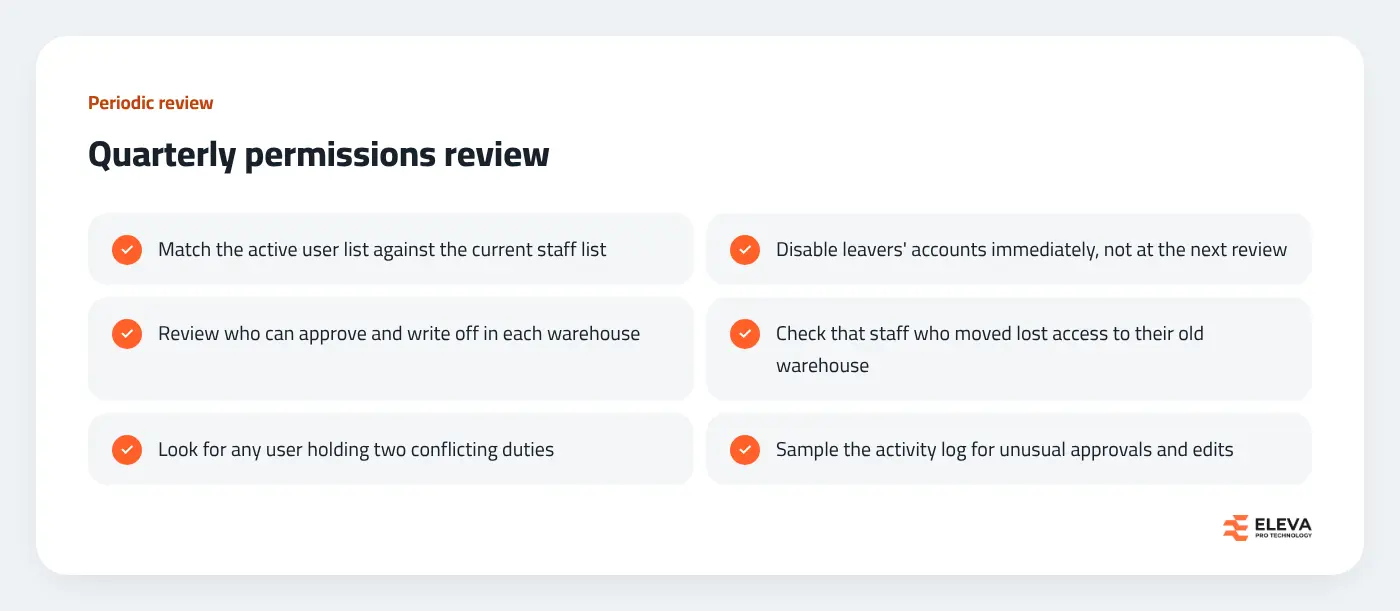
More important than the periodic review is acting at once: disable an account on the day the employee leaves, and remove a warehouse assignment on the day they move. If they hold company equipment, do not close their exit process until it is returned; see asset custody tracking.
How Eleva's system handles this
The Warehouse Tracking & Management System from Eleva ships with three roles (System Administrator, Warehouse Manager and Warehouse Operator), and you can create custom roles such as an auditor and pick their permissions one by one. These include separate permissions to approve issues, approve transfers, receive transfers, plan stock counts, perform them and view the activity log. A user can only grant permissions they hold themselves.
Each user is then linked to their warehouses through warehouse personnel assignments at Operate, Request or View-only level. The approval settings allow up to five levels triggered by movement value, each with approvers for specific warehouses; one person cannot approve more than one level of the same movement, and nobody except an administrator can approve an issue they created. The activity log is read-only, so entries cannot be edited or deleted; it shows values before and after each change, filters by user and date, and exports to Excel. Two-factor authentication can be enforced for selected roles, such as those with approval rights.
Conclusion
Good warehouse permissions answer three questions for every movement: who requested it, who approved it, and who handed it over or received it, and they make sure those are three different people wherever possible. Start with a simple matrix, block the basic conflicts, limit each employee to their warehouse, and review it all regularly. When you choose a system, test these rules during the demo, as our guide to choosing a warehouse management system suggests. If you would like help designing a permissions matrix for your company, contact us.
Try the Warehouse Tracking & Management System yourself: the live demo with sample data, and the step-by-step user manual. Request a demo from the product page.