Operations
SIM Tracking System
Know who holds every company SIM, what it costs and who had it before, across all carriers in one Arabic system instead of Excel and three carrier portals.
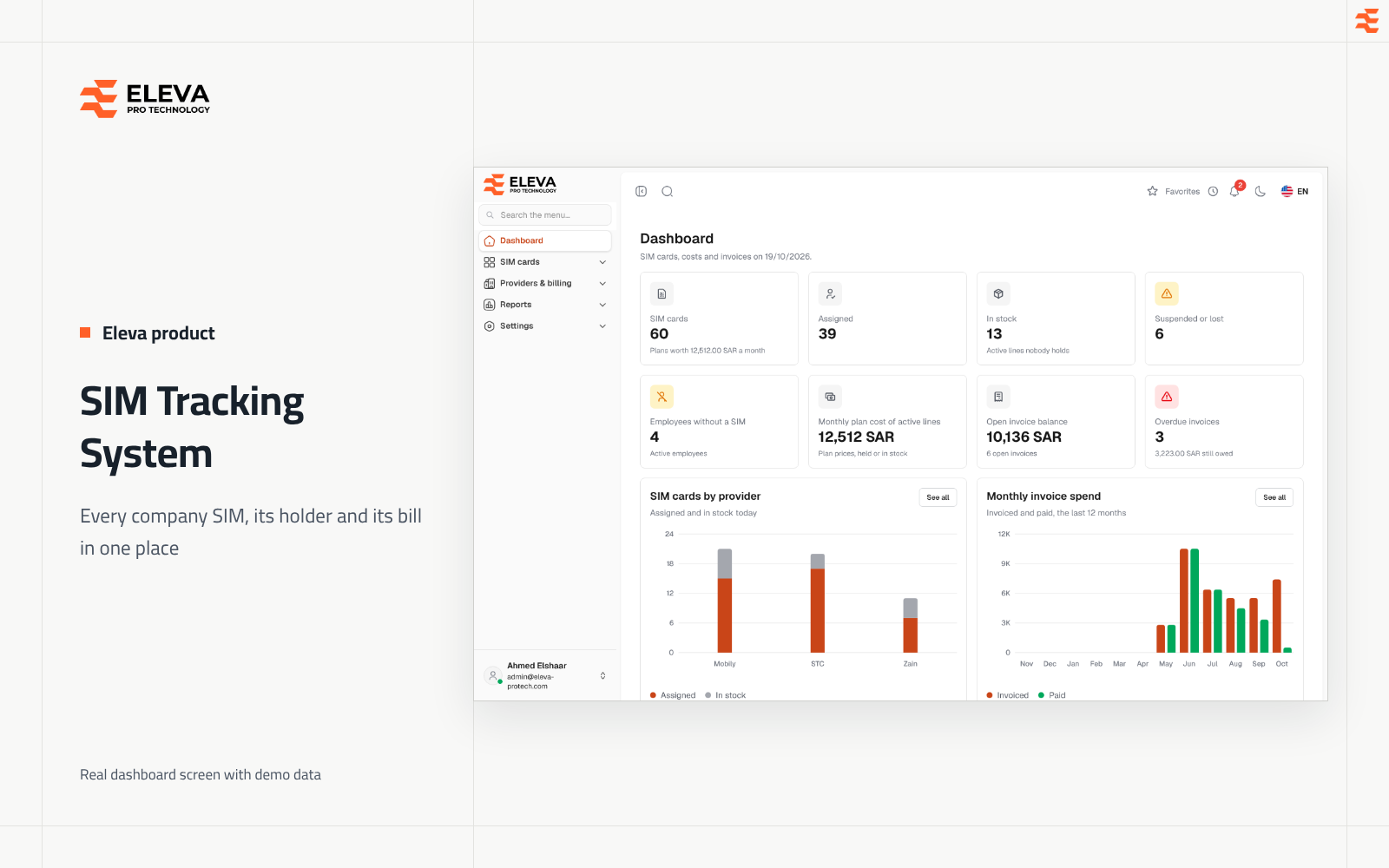
Overview
About this product
Eleva's SIM tracking system follows the mobile SIMs a company gives its employees in Saudi Arabia: which employee holds which line, its plan and monthly cost, who held it before, who has no SIM, each provider's invoices and payments, and upcoming renewals. It covers every carrier in one system and is sold as a licence with no fee per line.
At a glance
- A register of SIM cards with provider, plan, monthly price, renewal cycle, activation date and status (Active, Suspended, Lost or Cancelled).
- Assign, hand over and return lines as dated periods: one holder per SIM, and one SIM per employee, on any given day.
- Provider invoices with a line for each SIM, several payments per invoice and scanned bills attached.
- A dashboard and eight reports with Excel export: inventory, active assignments, employees without a SIM, cost per employee, spend by provider, invoice aging, uninvoiced SIMs and upcoming renewals.
- Employees kept up to date from Timesheet, a daily reminder digest, roles with a permission matrix, two-factor sign-in and an audit log of every change.
How it is sold: a licence and maintenance, not a monthly subscription
Most competing tools are monthly subscriptions that charge for every line or user, so the bill grows with your company. We sell the system differently:
- A one-time licence or a fixed annual fee: a price you know from day one, which does not change with the number of lines or users.
- An annual maintenance percentage: covers support, updates and bug fixes.
- Your own installation: on your server inside your network, so your data stays with you and can stay in Saudi Arabia.
- Arabic and English: a right-to-left Arabic interface and a full English interface on the same data.
The price depends on the modules you need and how it is installed. Request a demo and we send you a quote after it.
Why carrier portals and Excel are not enough
Carrier business portals in Saudi Arabia show one carrier's lines only and are built around the line, not the employee, so they cannot tell you who received a SIM or what each employee or project costs across all carriers. A spreadsheet keeps no handover history and sends no renewal reminders. Eleva SIM Tracking puts every carrier's lines in one custody record per employee, with cost per employee and provider and invoice aging.
What problems does this SIM management system solve?
In many companies, the list of business lines lives in a spreadsheet that someone updates when they remember. A line passes from one engineer to another on site and the sheet still shows the first name. An employee leaves and their SIM leaves with them. A suspended line keeps appearing on the bill, or an active line never appears on it, and nobody notices because the bill is paid as one total.
The system closes these gaps by recording each SIM once, with its own history, and by working out who holds it from the assignment periods rather than from a free-text column. Bills are entered line by line against the same SIM records, so the gap between "what we have in service" and "what the provider charged" becomes a report instead of a guess.
How it works: the life of a company line
1. Providers, plans and SIM cards
You first add each provider with its contact details and your account number, then its plans. A plan has a monthly price and a renewal cycle in days (30 by default, from 1 to 3,650). SIM cards are then added one by one or imported from an Excel or CSV file of up to 2,000 rows. The import is checked as a whole: either every row is valid and imported, or nothing is, with the errors listed row by row.
2. Assign, hand over and return
Assigning gives a line to an active employee from a start date, open-ended or until an end date. Handing over gives a line someone already holds to another employee in one step: the current holder's period ends the day before the new one starts. Returning ends the period on the return date, and the line is back in stock from the next day. Two periods of the same SIM, or of the same employee, can never overlap.
3. Service status
The status is the line's service status at the provider. Changing a held SIM to Suspended, Lost or Cancelled returns it from its holder in the same step and removes upcoming bookings. Such a line shows as Out of service and cannot be assigned until it is Active again.
4. Invoices and payments
Each provider bill is recorded with its number, invoice and due dates, billing period, one line per SIM and the total as billed. The total may differ from the sum of the lines, for example because of taxes or fees; the form warns but still saves. Payments are recorded against the invoice one by one, and its status (Unpaid, Partially paid, Paid or Overdue) follows them automatically.
5. Reports and reminders
The dashboard shows SIM counts, the monthly plan cost of active lines, open and overdue invoice balances, upcoming renewals and the latest assignments. Once a day, a digest reminds users of plans renewing soon and of invoices due or overdue, in the notification bell and by e-mail.
Modules
- SIM cards: the list with search by number or serial, filters by status, holding, provider and plan, import, Excel export and a page per SIM with its assignment history, next renewal and invoice lines.
- Assignments: every period, past, current and upcoming, with tabs for active, upcoming and ended periods, monthly hand-over and return counts and Excel export.
- Employees: the employee list as Timesheet keeps it, with the SIM each person holds today and their full SIM history.
- Providers and plans: contact details, account numbers, plans with monthly price and renewal cycle, and each provider's SIMs by status and open balance.
- Invoices: bills with lines per SIM, payments ledger, attachments, tabs by status and Excel export.
- Reports: eight reports, each with filters, Excel export and print.
- Settings: branding, language and formats, office time zone, e-mail, reminders, security, users, roles, audit log and API tokens.
On any day, every SIM is in exactly one holding state, worked out from its status and its assignments:
| Holding | When it applies |
|---|---|
| Assigned | An employee holds the SIM today |
| In stock | The SIM is Active and nobody holds it; only these can be handed out straight away |
| Out of service | The SIM is Suspended, Lost or Cancelled and nobody holds it |
Reports
- SIM inventory: every SIM with plan, price, status and current holder, and the monthly cost of active lines.
- Active assignments: who held which SIM on a chosen day, including a past date such as the last day of a billing period.
- Employees without a SIM: active employees who hold no line today, and the share they represent.
- Cost per employee: each plan's monthly price shared out by the days each employee held the SIM in the month.
- Spend by provider: a year of invoices per provider and month, with what was paid and what is still open.
- Invoice aging: open balances grouped as not yet due, 1-30, 31-60, 61-90 and over 90 days late.
- Uninvoiced SIMs: lines in service during a period that appear on no invoice for it, based on each SIM's status history.
- Upcoming renewals: plans renewing within 7, 14, 30, 60 or 90 days, soonest first.
Roles, permissions and security
Four roles ship ready: Super admin, Administrator, Data entry and Viewer. You can create your own roles from a permission matrix with one row per screen and actions such as View, Add, Edit, Delete, Export and Import, so an accountant can see invoices without touching SIM assignments, or a viewer can export reports without changing anything. Dashboard figures follow the same permissions, so two users may see different dashboards.
- Two-factor sign-in with an authenticator app and one-time recovery codes, which can be required for administrators.
- Password confirmation before sensitive changes, sign-in pauses after repeated wrong passwords, and security e-mails to account owners.
- A read-only audit log of every change, sign-in and settings update, with before and after values for each field.
- Invoice attachments that open only for signed-in users allowed to see invoices.
Employees from Timesheet and the API
Employees are not typed in by hand. Timesheet sends new employees and changes (names, codes, iqama numbers and status) through the system's REST API, and a Sync from Timesheet button brings the active employees on demand. When an employee is deactivated in Timesheet, their SIM is returned on the deactivation date. API tokens act as a chosen user, carry read or write abilities and expire after a year by default. If you need the data connected to other software, that is the core of our systems integration service.
Getting started
- Settings: company name and logo, default language, office time zone, currency, e-mail server and reminder windows.
- Providers and plans: add each provider, then its plans with monthly price and renewal cycle.
- SIM cards: import your current lines from the Excel template, with their activation dates.
- Employees: connect Timesheet with an API token, or sync on demand.
- Assignments: record who holds each line today.
- Users and roles: give each person the role that matches their work, and train them with the user manual.
- Invoices: enter the next provider bills line by line and record payments as they are made.
Try the system and read the manual before the demo
- The SIM Tracking System demo: the real system with sample data.
- User manual: every screen explained step by step with screenshots, in Arabic and English.
- The guided demo: press "Request Demo" and we walk you through the system with your own workflow in mind.
Who it fits, and who it doesn't
A good fit for
- Companies that give business SIM cards to employees and need to know who holds each line.
- Finance and admin teams that receive monthly bills from several providers and want to check them line by line.
- Organisations with staff turnover or field teams, where lines move often between people.
Not a fit for
- Managing handsets or the data on them: the system tracks SIM lines, their holders and their bills.
- Telecom operators billing their own subscribers: it records the bills your company receives.
If you need the system adapted to your process, we can extend it through web application development. Contact us to see it on data close to yours.
Key Features
What's included
One register for every line
Each SIM is recorded with its number, ICCID serial, provider, plan, activation date, status and notes, and keeps its full history even after it is deleted.
Assign, hand over and return
Every hand-over is a dated period. Handing a line to a colleague ends the current holder's period the day before, in one step, with no gaps or overlaps.
Status changes that return lines
Marking a held SIM as Suspended, Lost or Cancelled returns it from its holder on the date you enter and removes upcoming bookings.
Excel and CSV import
Import up to 2,000 SIMs per file from the template. The file is checked as a whole: every row is imported, or none, with errors listed by row.
Providers, plans and renewal dates
Plans carry a monthly price and a renewal cycle. Each SIM's next renewal is counted from its activation date, keeping month-end and yearly dates exact.
Invoices line by line
Record each provider bill with one line per SIM, the billing period, the total as billed and up to 10 attached files, PDF, JPG or PNG.
Payments ledger
Record several payments per invoice with date and note. Paid, balance and status (Unpaid, Partially paid, Paid or Overdue) are worked out from them.
Eight ready reports
Inventory, active assignments, employees without a SIM, cost per employee, spend by provider, invoice aging, uninvoiced SIMs and upcoming renewals, with Excel export and print.
Daily reminders
A daily digest of plans renewing soon and invoices due or overdue, in the bell and by e-mail, sent to each user according to what they may see.
Employees from Timesheet
Timesheet keeps the employee list up to date through the API. An employee deactivated there returns their SIM on the deactivation date.
Roles, audit log and two-factor sign-in
Built-in and custom roles from a permission matrix, a read-only audit log with before and after values, and two-factor sign-in that can be required for administrators.
Specifications
Technical details
- Platform
- Web application in the browser, on desktop and phone screen sizes
- Languages
- Arabic (RTL) and English (LTR), chosen per user, with light and dark modes
- Sales model
- One-time licence or fixed annual fee + annual maintenance, no per-user fees
- SIM statuses
- Active, Suspended, Lost and Cancelled
- Holding rules
- One holder per SIM and one SIM per employee on any day; periods never overlap
- SIM import
- Excel (.xlsx, .xls) or CSV, up to 5 MB and 2,000 rows per file, all or nothing
- Renewal cycle
- 1 to 3,650 days per plan; 30 days by default
- Invoice attachments
- PDF, JPG or PNG, up to 5 MB each and 10 files per invoice
- Reports
- Dashboard plus 8 reports, each with Excel export and print
- Reminders
- Daily digest in the bell and by e-mail, at 08:00 office time by default
- Built-in roles
- Super admin, Administrator, Data entry and Viewer, plus custom roles
- Security
- Two-factor sign-in, password confirmation, sign-in limits and a read-only audit log
- Integration
- REST API (/api/v1) with expiring tokens; employees synced from Timesheet
Gallery
Inside the product
FAQ
Frequently Asked Questions
How much does the SIM Tracking System cost? Is it a monthly subscription?
Can the system be installed on our own server?
Does the system support Arabic and English?
Where does the employee list come from?
Can two employees hold the same SIM at once?
What happens when a SIM is lost?
Can I import the SIM cards I already have?
How do I find lines the provider did not bill?
How is the cost per employee calculated?
Can I limit who sees invoices?
Ready to see SIM Tracking System in action?
Tell us how your team works and we will walk you through the product with your own workflow in mind.