To check a monthly bill for rented manpower, cost each worker from their own dates rather than from headcount: the monthly price per head, divided into a daily rate, less the days the worker was not with that supplier or not active, and less the absence days covered by approved leave or absence records. Do this from a timesheet that has been locked, so the figures behind the bill can no longer change. Cleaning, maintenance and facility contracts often run on workers supplied by manpower or rental companies, and the monthly bill is where small record-keeping gaps turn into money. This article explains where those bills go wrong, what goes into each worker's cost, and how to close the month so the bill holds up.
Key takeaways
- Bill per worker and per day, not per head: joins, moves and exits mid-month change the amount.
- A worker who moves between suppliers during the month belongs on each supplier's bill for their days there.
- Only absences backed by an approved record should reduce the cost; that keeps disputes short.
- Treat a bill generated before month end as an estimate, and issue the final one from a locked month.
- Compare actual workers with the contract count per project every month, not only when the client complains.
Why do rented manpower bills go wrong?
Most errors are not fraud. They are dates that were never recorded, or were recorded in a file nobody connected to the bill.
- Headcount instead of days. The supplier bills 40 workers because 40 names were on the list on the 1st. Three joined later and two left before the 20th.
- Moves between suppliers. A worker transferred from one rental company to another mid-month appears on both bills for the full month, or on neither.
- Absences recorded late. Sick days reach HR after the bill was approved, and nobody reopens it.
- Old prices. A supplier's rate changed, but workers added before the change still carry the old price.
- A moving target. The timesheet is edited after billing, so the bill and the timesheet no longer agree and neither side can prove which is right.
What goes into each rented worker's monthly cost?
Four inputs, all of which should come from records rather than from memory:
- Price per head. The monthly amount agreed with the supplier for that worker. Rates often differ by gender, so a sensible default is the supplier's rate for the worker's gender, adjustable per worker.
- Daily rate. The monthly price divided by the number of days in that month. A 31-day month gives a lower daily rate than a 28-day month, which is why the divisor must be explicit.
- Days not billable. Days before the worker joined that supplier, after they left it, or while they were inactive.
- Absence days. Days covered by approved leave or absence records while the worker was billable.
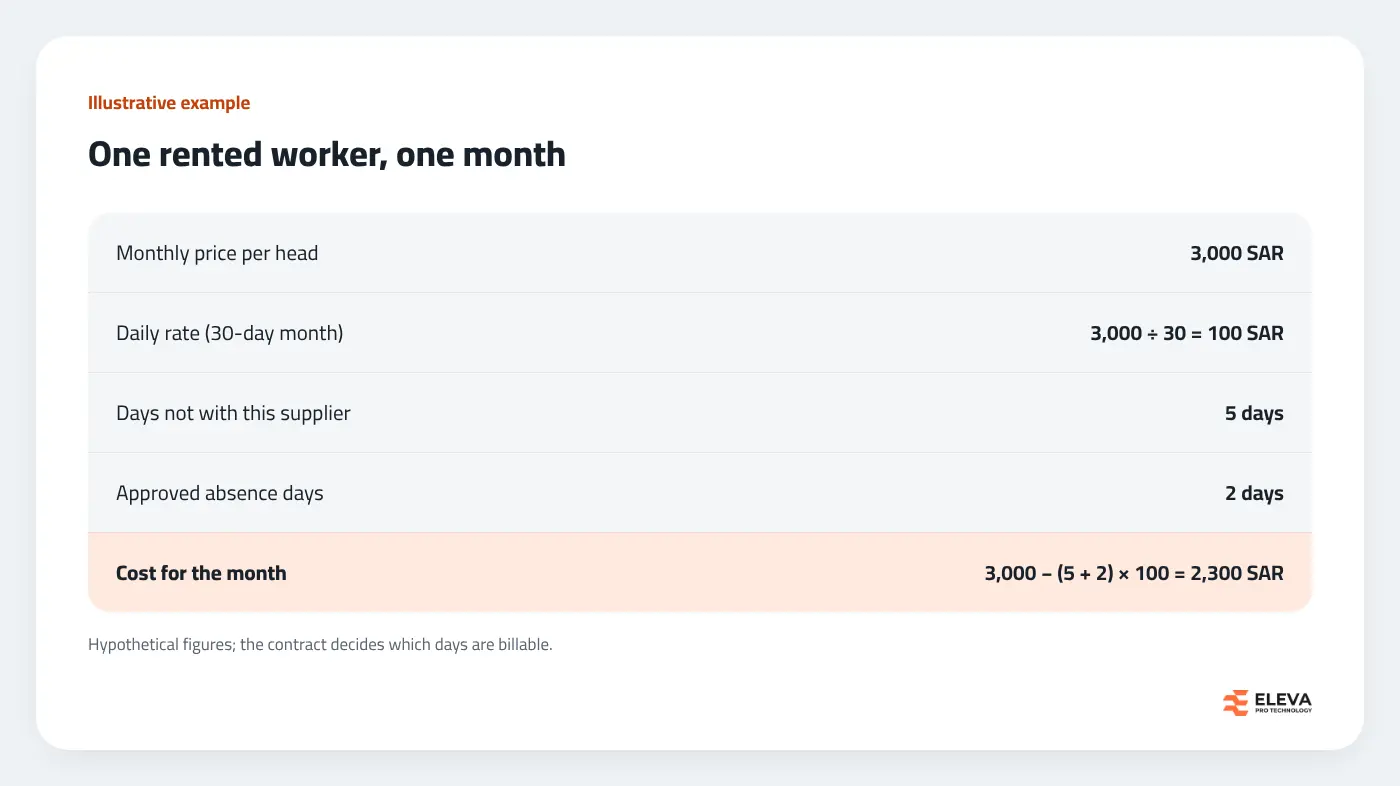
Whether a given absence reduces the bill is a contract question. Some contracts deduct every absent day, others only unauthorised absence, others require a replacement worker. Read the contract first, then make sure the system records the leave types that matter for it.
Which records must be right before the bill?
The bill is only as good as the history it reads. Check these four before generating it:
- Company history. Each worker's supplier, with the date they started and stopped with it. This is what splits a mid-month transfer across two bills.
- Activations. The dates each worker became active or inactive. An exit recorded a week late costs a week.
- Project history. Not used for the supplier's amount, but needed to charge the cost to the right project and to answer the client's headcount questions.
- Approved transactions. Leave, sickness and absence entered for the month, with nothing still waiting for a decision.
Our article on tracking employee moves between projects covers how to keep these histories clean.
Is each project staffed as the contract says?
The supplier's bill is one side. The other is your own client contract, which often fixes a number of workers per project. Each month, compare the workers on each project with that number, over the whole month or a date range, together with the days they were absent. A project consistently below contract is exposed to penalties, and one above it may be carrying workers nobody is paying for.
Look at average absence per day as well as the headcount. A project at its full count with two workers absent every day is, in practice, two workers short.
How do you close the month so the bill holds up?
Run the calculation during the month as a running estimate. It shows finance roughly what is coming and catches missing records early. But issue the final bill only after the timesheet month is locked, because from that point no transaction dated in the month can be added, changed or deleted.
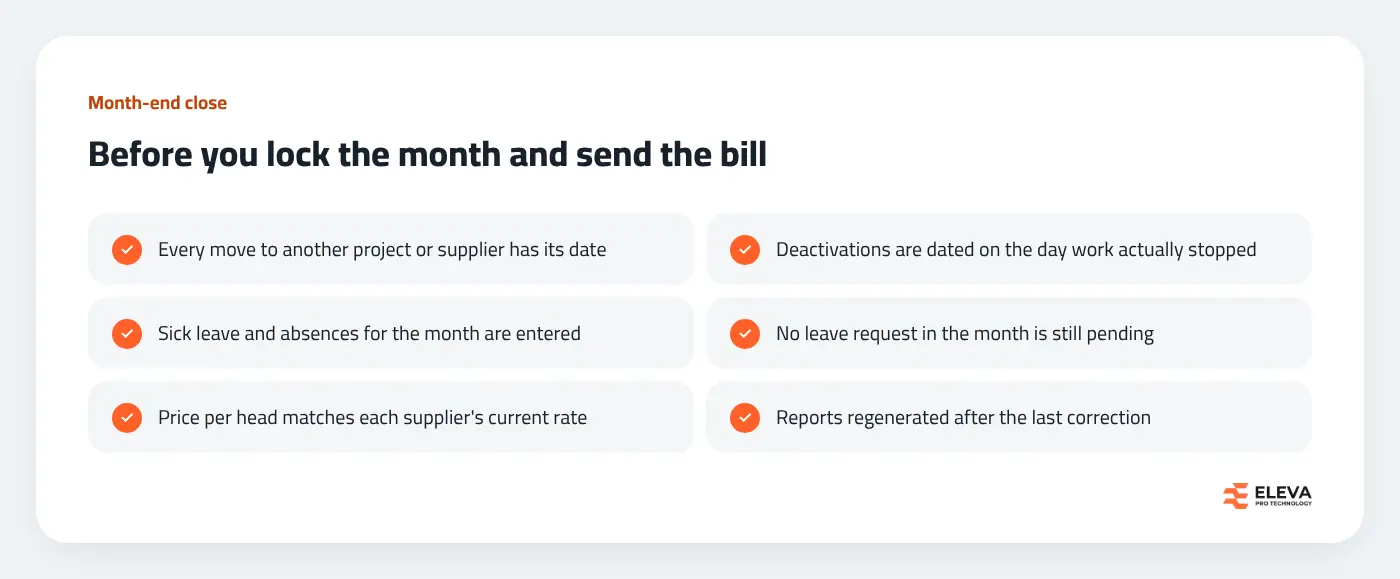
When the supplier's own invoice arrives, compare it line by line with your report: worker, days, absences and amount. Differences usually trace back to a single date, such as a join, a transfer or an exit, that one side recorded and the other did not.
What happens when a supplier changes its price?
A new rate agreed with a supplier does not reach the workers already on your books by itself. The price stored against each worker is what the bill reads, so a rate change needs two actions: update the supplier's default price, which covers workers added from now on, and update the price per head of every worker that supplier already provides. Agree with the supplier on the date the new rate applies, and make the change before the first month it affects is generated. Otherwise the running estimate and the supplier's invoice will disagree by exactly the rate difference, and the gap will surface only when someone compares the two line by line.
Keep the agreement itself on file. When a dispute comes months later, the useful answer is the rate, the date it started and who changed it in the system.
Who should see the billing figures?
Finance needs the company-wide totals. Site supervisors need to check their own workers' lines, because they know who was actually on site, but they do not need every supplier's total cost. A system that shows supervisors only their own workers' lines, without company totals, lets them catch errors without widening access to commercial figures.
How does Eleva's system handle rented manpower billing?
In the Timesheet & Leave Management System from Eleva, workers supplied by rental companies are kept on a separate Rent employees screen. Each has a price per head that is filled in from their company's price for their gender and can be changed. Moving a worker to another company asks for the company change date, and their company history records it.
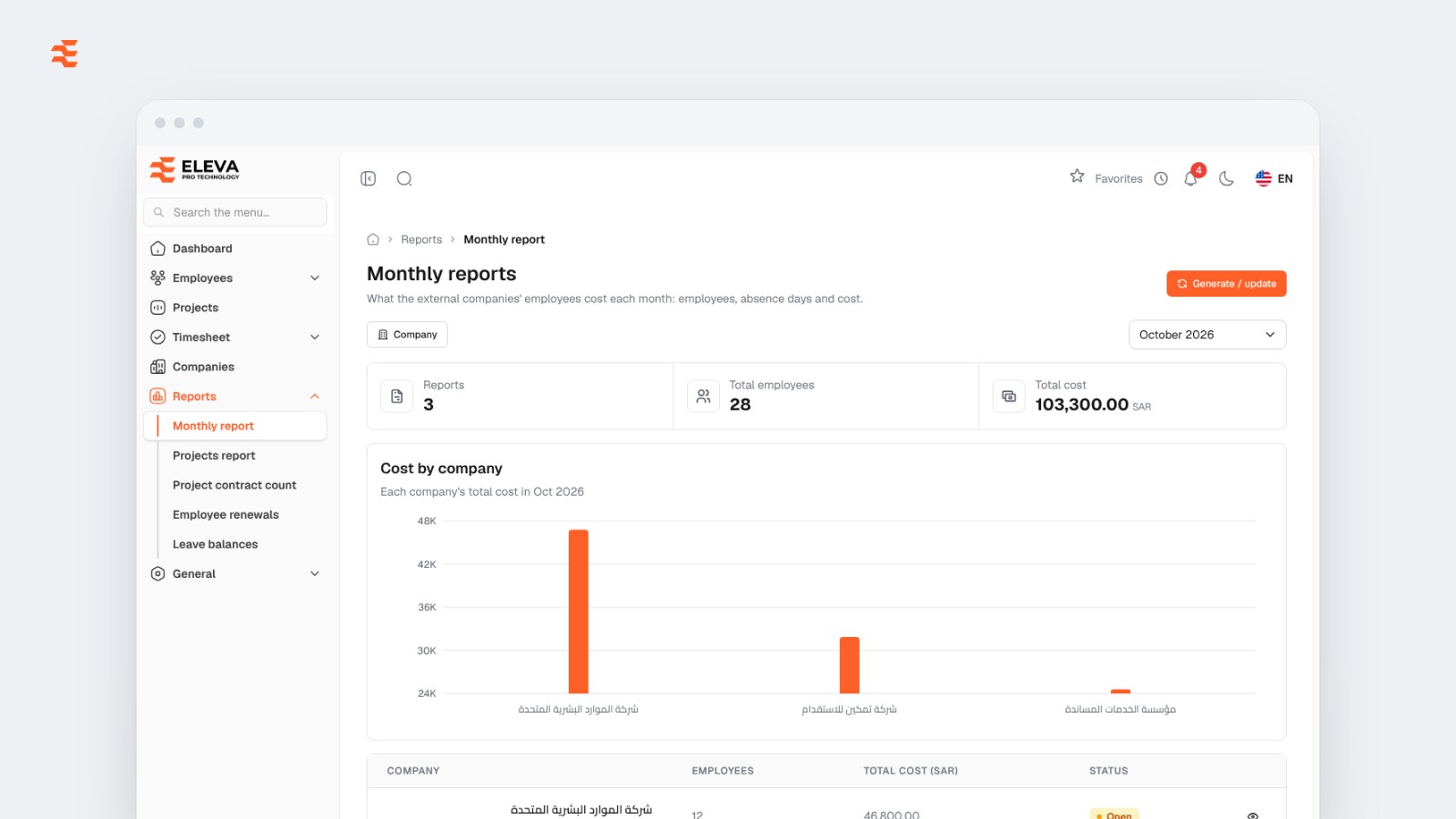
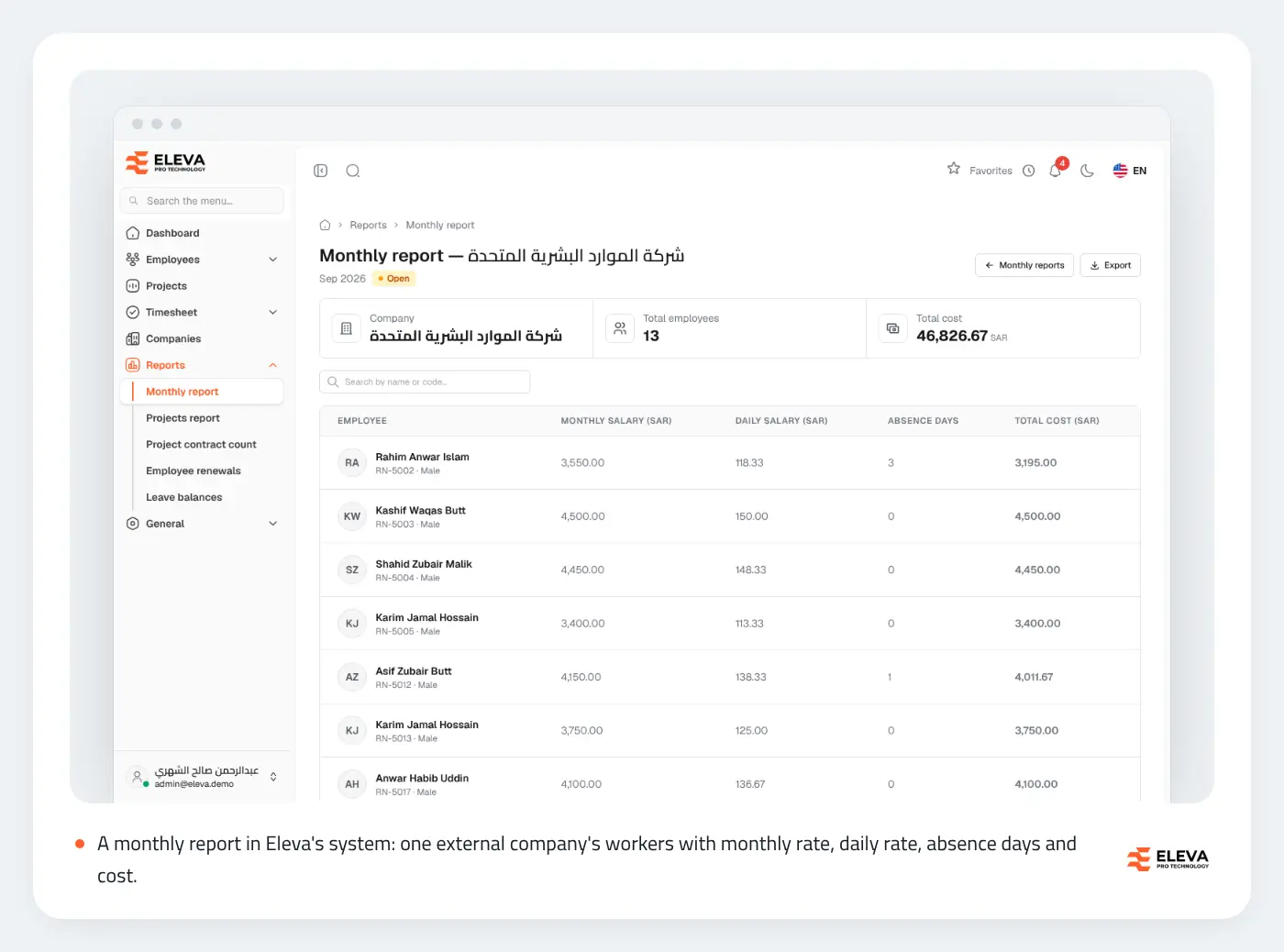
The Monthly reports screen gives one report per external company and month, with the number of employees and the total cost after absences. Each employee's cost is their monthly rate reduced for days they were not active or not with that company, and for absence days covered by approved transactions; a worker who moved between companies appears in each company's report for their days there. Opening a report shows monthly salary, daily salary (the monthly rate divided by the days in the month), absence days and total cost per employee, with an Excel export.
Generating the current month gives a running estimate, and a report stays open until its timesheet month is locked. Supervisors see only their own employees' lines, without company totals. The Project contract count report compares each project's employees with its contract count for a month or a date range, with absent days and average absent per day.
Conclusion
Rented manpower bills become easy to check once every worker's cost is built from dates: when they were with the supplier, when they were active, and which absences were approved. Keep those records current through the month, decide every pending request, lock the month, and only then issue or approve the bill. For the full set of capabilities to look for, see our guide to choosing a timesheet and leave management system, or contact us to run a month of your own data through the monthly report.
Try the Timesheet & Leave Management System yourself: the live demo with sample data, and the step-by-step user manual. The system is sold as a one-time licence or a fixed annual fee plus annual maintenance, installed on your company's server with no fee per employee. Request a demo from the product page.