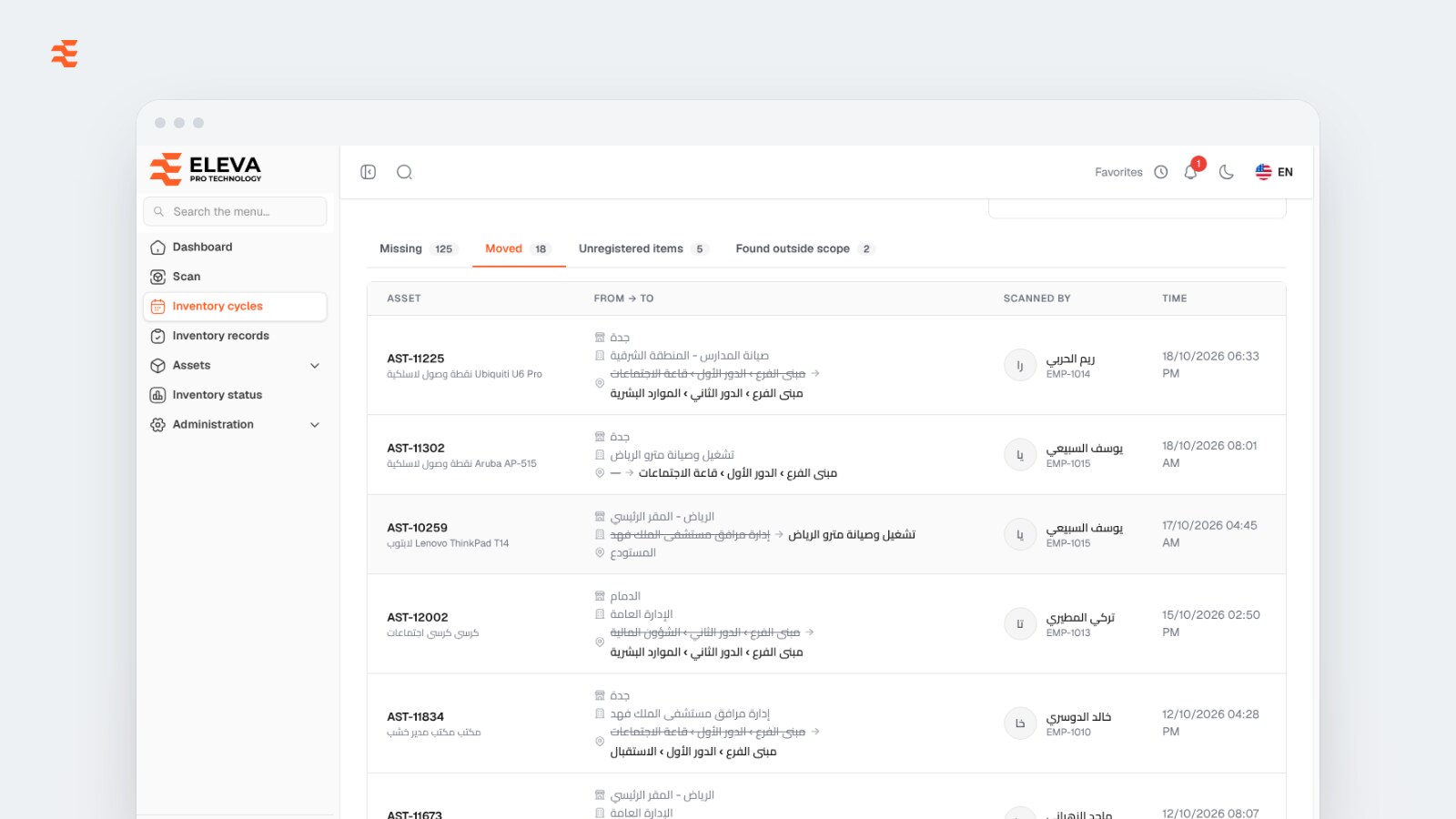
Reconciling the fixed asset register with a physical count means sorting every difference into one of four types (missing, moved, unregistered, or found outside the count's scope) and taking a documented decision on each: search again or mark as missing, confirm the new place, register the item, or fix the scope next time. The register is only reconciled when every line has an owner and a decision. A count that ends with a list of differences and no decisions leaves the register as unreliable as before, just with a report attached. This article explains what each type of discrepancy usually means, what to do about it, and how to keep the register close to reality between counts.
Key takeaways
- Classify every difference first; each type needs a different action and a different owner.
- "Not found" is not the same as "lost": search again before marking anything missing.
- A move confirmed by a scan should update the register at the same moment, not in a later clean-up.
- Unregistered items are register gaps, and they need a code before they can be counted.
- Write-offs and disposals are management decisions; the count supplies the facts, not the approval.
What does reconciling the asset register actually mean?
The asset register says what the organisation owns and where each asset is. The physical count says what the team actually saw, and where. Reconciliation is the work of explaining every gap between the two and correcting the register so it matches what was found, with a trail of who decided what.
The trail matters as much as the corrections. Finance and auditors will want to see why an asset left the register or changed place, not just that it did. A count where each scan is recorded with the person, the time and the place before and after gives them that evidence directly.
What are the four types of discrepancy?
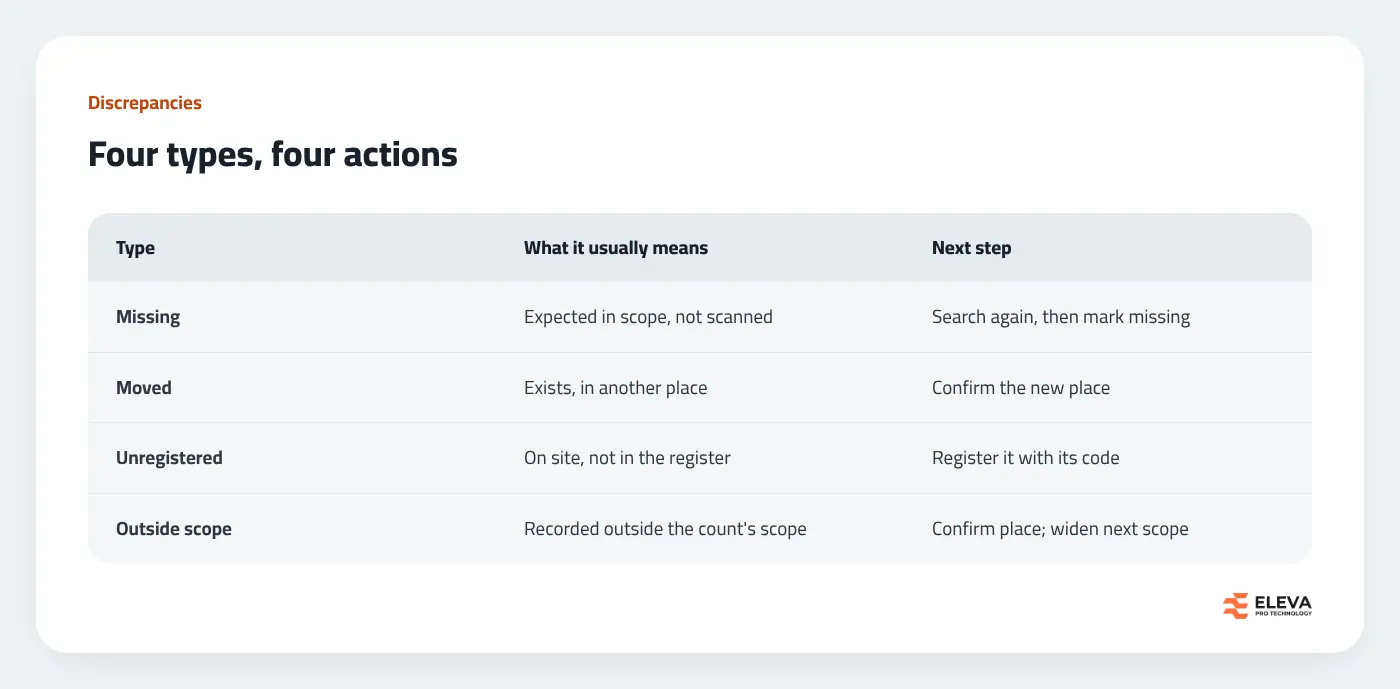
Missing: expected but not scanned
These are assets in the count's scope that nobody scanned. Common reasons: the asset is in a room nobody visited, it is with an employee working elsewhere, its label is missing or unreadable, it was disposed of without the register being updated, or it has genuinely gone.
What to do: sort the list by branch and by last time each asset was seen, and send the team back for a targeted second search. Check custody records for assets assigned to people. Only what is still not found after that should be marked as missing, and that status should stay reversible: if the asset turns up later, a scan should bring it back.
Moved: found somewhere other than recorded
The asset exists, but in another branch, project or room. Moves are usually the least worrying difference, as long as the scan updates the register at the moment it is recorded. A list of moves to type in later is how registers drift out of date again.
What to do: confirm that the moves are real, then look for patterns. Many moves from one floor to another may be a reorganisation that should have been recorded; moves that change the project may matter to finance if costs are tracked by project.
Unregistered: found but not in the register
An item on site that the register does not know: a recent purchase, a donation, equipment transferred from another entity, or an old asset that was never recorded. These are gaps in completeness and they cannot be scanned until they have a code.
What to do: record each one during the count with a short description, where it was found and any code already on it. Afterwards, decide whether it is a company asset; if it is, register it with that code so the count report can link the finding to the new asset.
Outside scope: found, but recorded somewhere the count did not cover
The asset was scanned during this count, but its recorded place was in a branch or project outside the count's scope. It is not missing, and it may not be wrong either: it may simply have moved from an area you are not counting this time.
What to do: check whether the move is real and confirm the new place; if many assets show up outside scope, widen the scope of the next count.
Who decides what after the count?
Keep the count team and the decision-makers separate. Counters record facts. Branch leads explain them. Finance and management decide on what affects the books:
- Location corrections: no approval beyond the scan itself, provided the scan is recorded with the person and time.
- Registering new items: the asset manager, following your normal rules for what counts as an asset.
- Marking as missing: the asset manager, after the second search, with the list shared with finance.
- Write-off or disposal of missing assets: a management decision under your financial policies, never an automatic result of the count.
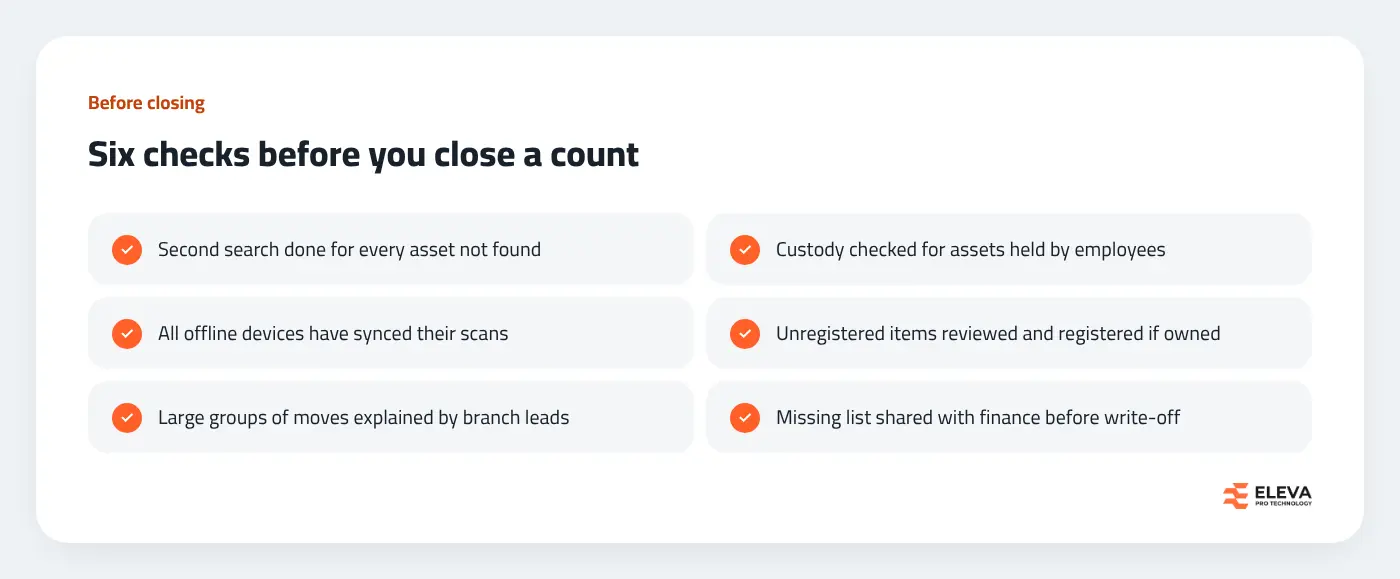
What should you check before closing the count?
What should you hand finance at the end?
Finance does not need every scan; it needs a short, closed package it can rely on:
- A summary: assets in scope, how many were scanned, and how many were not found.
- The final missing list, after the second search, with the last date each asset was seen.
- The list of moves that changed the project or branch, if costs or ownership follow those.
- The unregistered items, and which of them were added to the register.
- The date the count was closed and who closed it, so nothing can be added afterwards without a trace.
How do you keep the register right between counts?
The fewer differences a count finds, the faster it reconciles. Three habits help most:
- Move assets by scanning them. When an asset changes room or branch, scanning it and confirming the new place keeps the register current without a separate edit.
- Close custody properly. When equipment comes back from an employee, record the return and its condition, so the next count does not chase it.
- Check coverage during the year. A report of which assets have not been seen at all this year, by branch, shows where the next count will struggle.
How Eleva's system handles reconciliation
In the Asset Inventory System from Eleva, the result of each inventory cycle is a discrepancy report with the four tabs described above: Missing (with branch, project, status and last scan), Moved (with the old place struck through and the new one, who scanned and when), Unregistered items (with the code on the item, where it was found and whether it has since been registered) and Found outside scope (with where the asset was registered and where it was found). It exports to Excel with five sheets, including a summary.
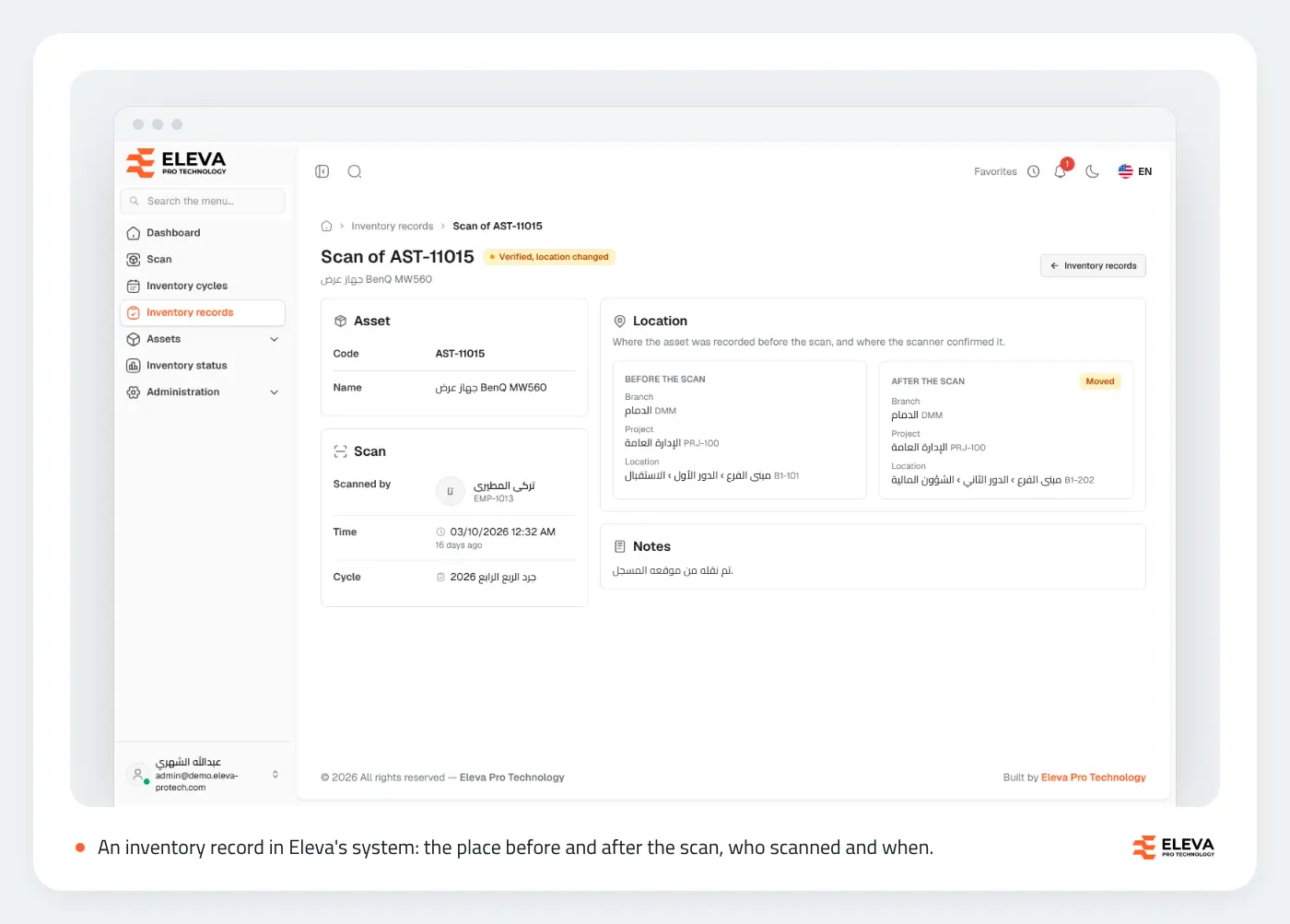
Every scan is an inventory record showing the place before and after the scan, the person and the time, and records cannot be edited or deleted. A scan that changes the place updates the asset at once. An unregistered-item report is linked automatically when an asset with the same code is added, by hand or by import.
When the cycle is closed, the assets not found can be marked as Missing in one step, and any of them scanned later returns to Active. For an ERP that keeps the financial side, signed webhooks can report closed cycles, scans and unregistered items as they happen, and the REST API gives read access to cycles and their discrepancy report.
Conclusion
Reconciliation turns a count into a register you can trust: classify every difference, search again before declaring anything missing, register what was found, and keep the trail of who decided what. If you are preparing the count itself, see our year-end fixed asset count plan; for choosing a system, our guide to fixed asset inventory systems. Or contact us to see a discrepancy report on your own data.
Try the Asset Inventory System yourself: the live demo with sample data, and the step-by-step user manual. The system is sold as a one-time licence or a fixed annual fee plus annual maintenance, installed on your company's server with no fee per asset. Request a demo from the product page.